Organizations
An organization is a billing parent that owns multiple contractor companies. Use organizations for:
- Franchise networks (e.g., a national plumbing brand with regional franchises)
- Multi-location operators (one parent, several locations each set up as a company)
- Holding companies that bill consolidated rather than per-company
Companies that are not part of an organization bill independently. Companies that are part of an organization roll up to the organization's billing.
Creating a new organization
- Click Organizations (opens in a new tab) in the sidebar.
- Click New organization (opens in a new tab).
- Fill in the form:
- Name
- Any descriptive fields the form requests
- Save.
Attaching a company to an organization
You attach companies from the company side, not the organization side:
- Open the company's Edit page.
- Find the Organization field.
- Pick the parent organization.
- Save.
The company is now under that organization. Its invoices, billing, and rollups reflect the new parent on the next billing cycle.
Detaching a company from an organization
Same flow — open the company's Edit page, clear the Organization field, save. The company resumes billing on its own.
Discarding an organization
If an organization is no longer in business or is being consolidated:
- From the organization's detail page, click Discard.
- The portal will refuse if any active companies are still attached to it — detach them first.
- Discarded organizations remain in the database (you can Undiscard later) but are excluded from active reporting.
Organization vs. company decisions
When onboarding a new contractor, ask: does this customer have multiple businesses that should bill together?
- Yes → create an organization, then create companies under it
- No → just create a company, leave the Organization field empty
You can always migrate a standalone company into an organization later if the customer expands.
What rolls up
| Field | Rolls up to org? |
|---|---|
| Calls | Yes (visible at org level) |
| Recordings | Yes |
| Invoices (if billed at org level) | Yes |
| Members | No — each company has its own member list |
| Playbook | No — each company has its own |
| Inbound numbers | No — attached to companies |
| Trades | No — attached to companies |
Invoicing an organization
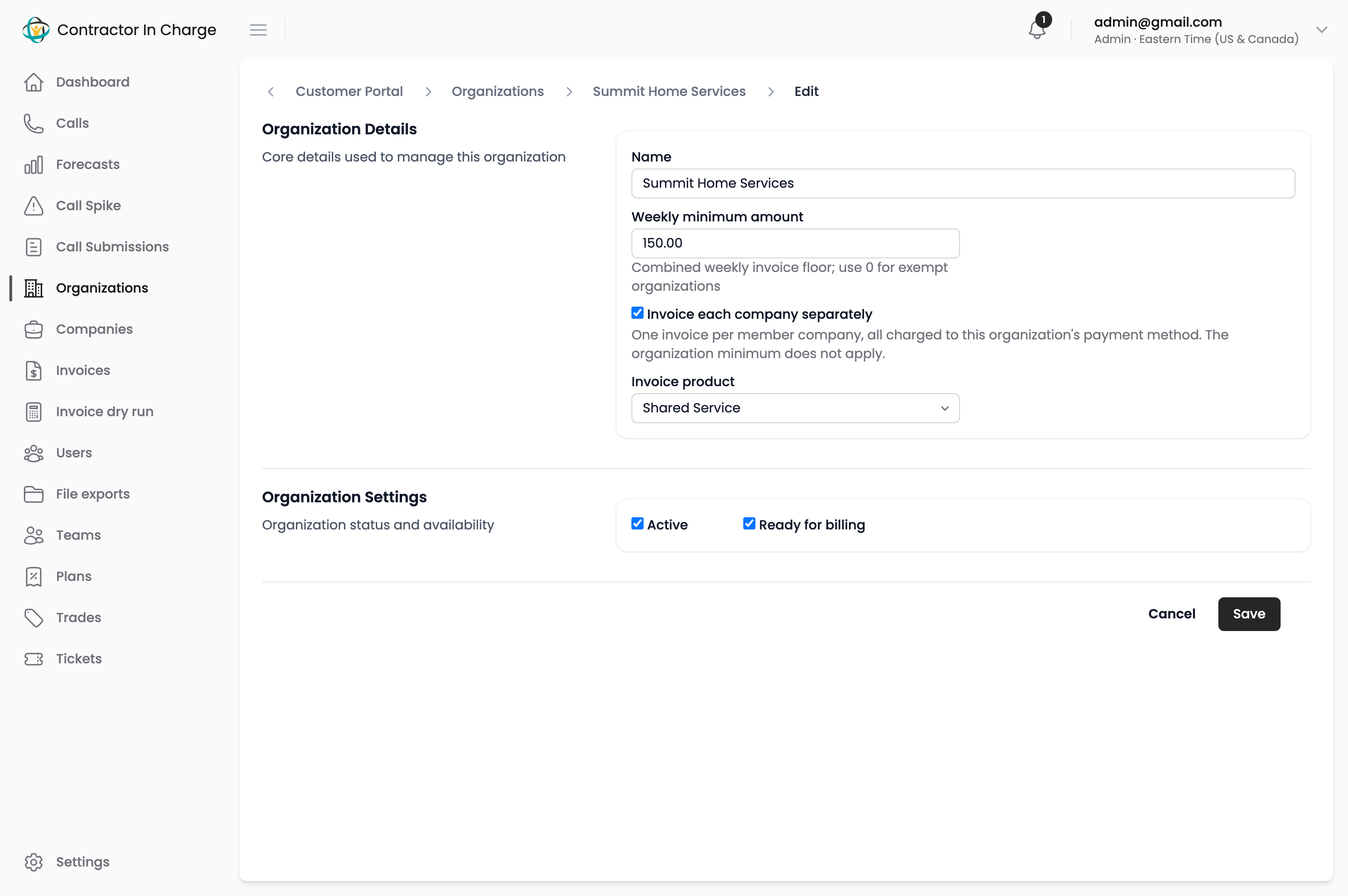
An organization's edit page has two billing settings:
- Weekly minimum — the floor for the organization's combined weekly invoice. If its companies' usage and fees add up to less, an adjustment line brings the invoice up to the minimum.
- Separate invoices — tick it to give each member company its own invoice on its own Stripe customer. The customer is named "organization:company" in QuickBooks' own parent:sub form (for example "Zephyr, LLC (ZEPVOS2025):Blue Valley (CO002-BlueValley)"), using both billing names, so finance's QuickBooks export lands on the sub-customer under the parent. Each company's owner adds a payment method on the company's own Payment methods page. Until a company has its Stripe customer, its invoices go on the organization's. The weekly minimum does not apply in this mode.
See How billing is calculated for the full rules.
Naming organizations
Match the legal/operational entity, not a brand. "Acme Holdings LLC" is more durable than "Acme Plumbing Group" if the parent might add HVAC subsidiaries later.
Next
- Companies at Scale — the company side of the relationship
- Stripe Billing — how org-level billing actually works