Contracts
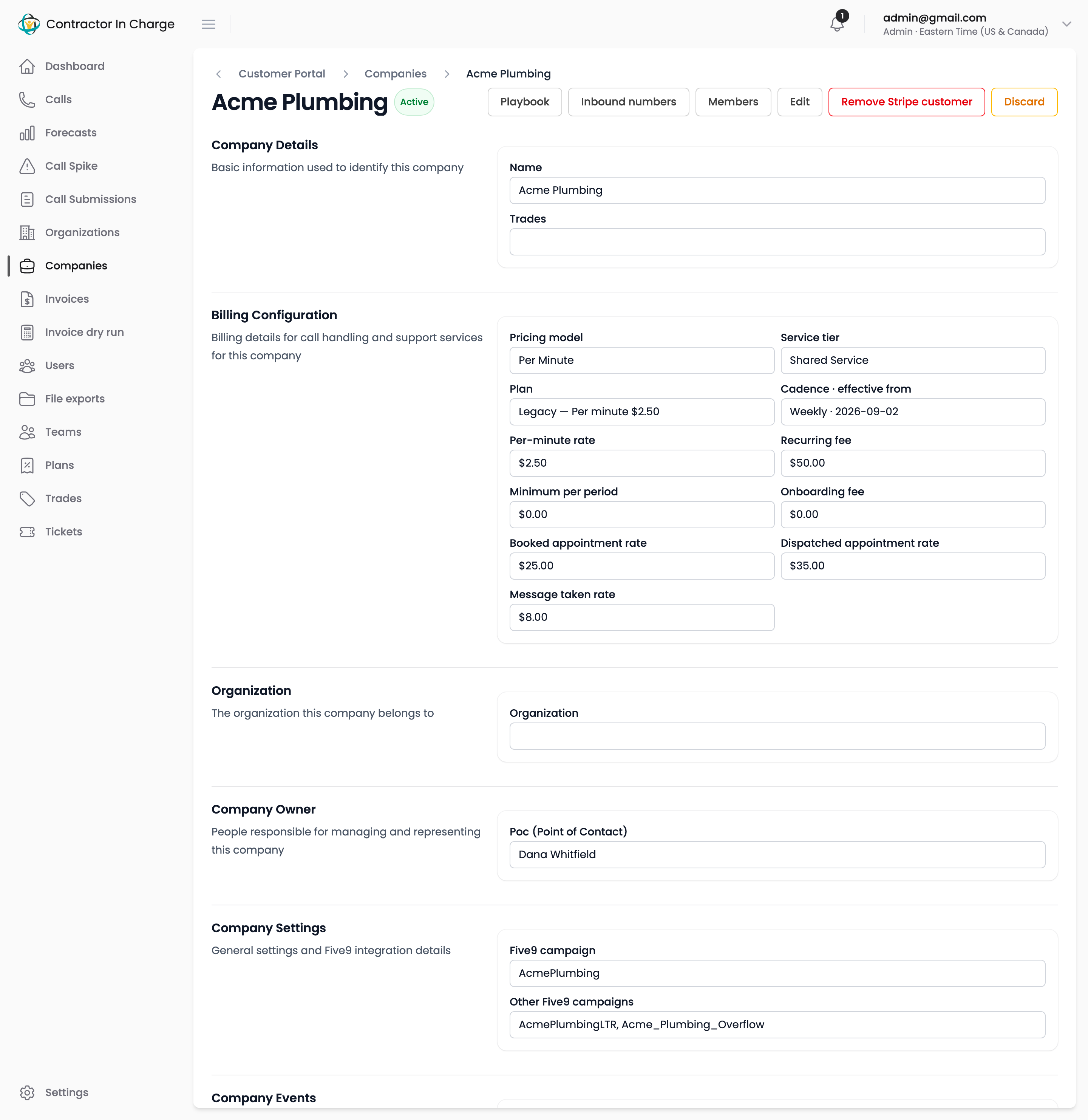
Every company bills under a contract: the pricing model, cadence and numbers in force from a given date. A contract starts from a plan and any number on it can be changed for that client.
The contract appears in the Billing Configuration section of the company page, and is edited from the company's Edit page.
Pricing models
| Model | Bills | Typical use |
|---|---|---|
| Per Minute | Handle minutes × per-minute rate, plus the recurring fee, subject to the minimum per period. | Most existing clients. |
| Bundle | The recurring fee covers the included minutes; minutes beyond them bill at the overage rate. No rollover, no separate minimum. | Clients on the standard menu. |
| Launch | Handle minutes × per-minute rate, with no fee and no minimum, until the launch end date (90 days by default). After that the portal refuses to invoice until a bundle is chosen. | New clients in their first 90 days. |
| Leads to Revenue | A rate per booked appointment, per dispatched appointment and per message taken, plus the recurring fee. | Clients paying per outcome. These invoices are prepared manually; the portal shows the counts. |
The fields
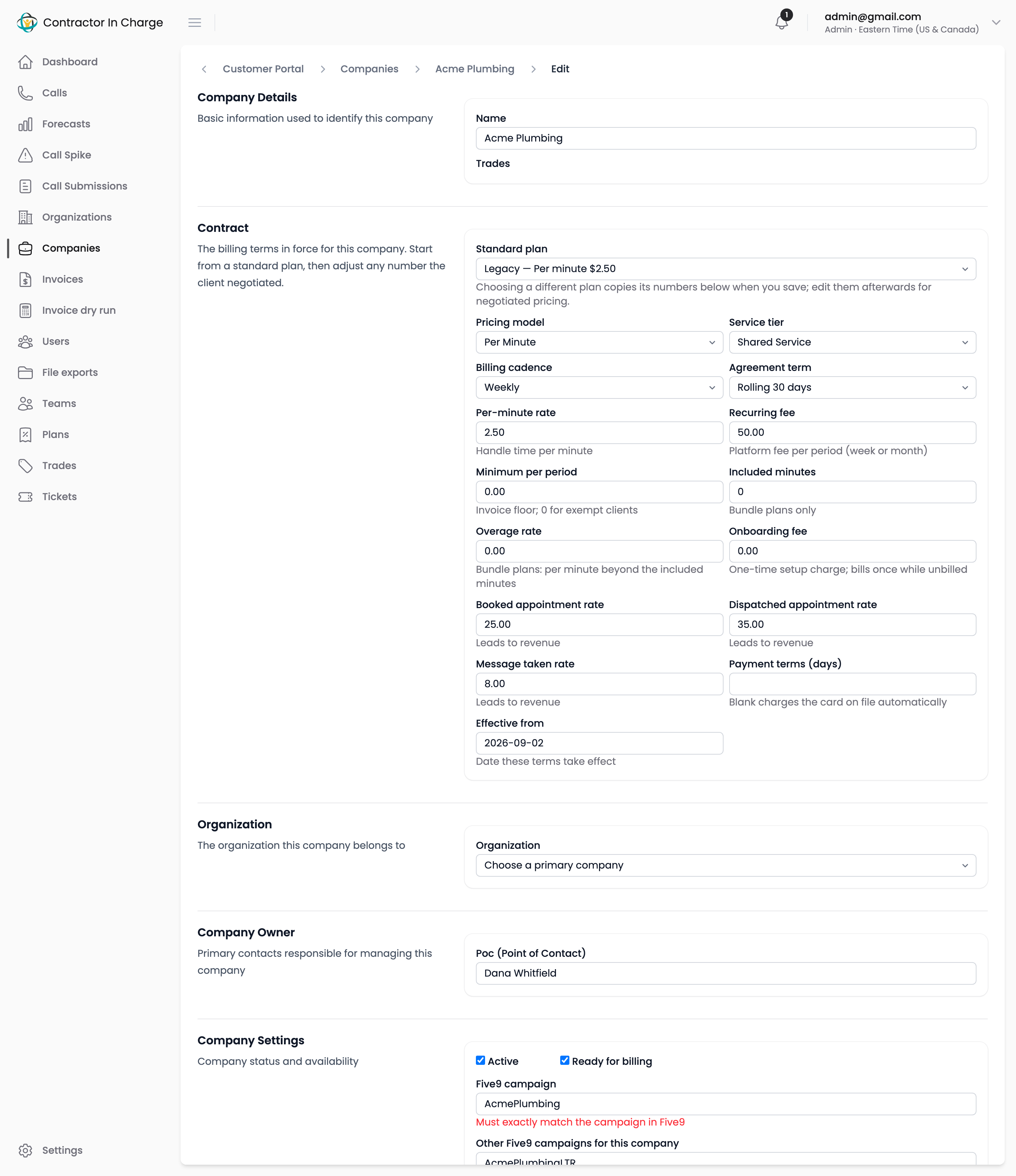
| Field | Meaning |
|---|---|
| Standard plan | The plan the terms came from. Choosing a different plan copies its numbers into the fields below when you save; edit them afterwards for negotiated pricing. "Custom terms (no plan)" means the numbers were entered directly. |
| Pricing model | One of the four models above. |
| Service tier | Shared Service or VIP Service. Informational for per-minute clients; it selects the fee for bundle plans. |
| Billing cadence | Weekly (Sunday to Saturday), Monthly (calendar month) or Monthly, issued on the 25th (the billing weeks ended by the 25th, due on the 10th of the next month). See How billing is calculated. |
| Agreement term | Rolling 30 days or Six month revolving. Recorded for reference; the portal does not enforce it. |
| Per-minute rate | Charged per handle minute (per minute and launch models). |
| Recurring fee | The platform fee per period: once per week, calendar month or 25th-cycle invoice. |
| Minimum per period | Invoice floor. If usage plus fee falls below it, an adjustment line brings the invoice up to this amount. Zero means no minimum. |
| Included minutes | Bundle plans only: minutes covered by the recurring fee. |
| Overage rate | Bundle plans only: per minute beyond the included minutes. |
| Onboarding fee | One-time setup charge. Bills once, on the first invoice after it is set, then never again. |
| Booked / dispatched appointment rate, message taken rate | Leads-to-revenue rates per outcome. |
| Payment terms (days) | Blank charges the card on file when the invoice is created. A number (for example 10) makes Stripe email the invoice with net-N terms instead. |
| Effective from | The date these terms take effect. |
Changing a client's terms
- Open the company and click Edit.
- In the Contract section, either pick a different standard plan (its numbers are copied when you save) or change the individual fields.
- Set Effective from to the date the new terms apply.
- Save.
The next invoicing run for a period starting on or after the effective date uses the new terms. Use the invoice dry run to confirm the result before the run.
Checking terms against the agreement
Because contracts keep their own numbers, a client on a negotiated rate shows that rate even when the plan it came from changes. To review who is on which scheme, open Plans; each plan lists how many current contracts use it. Admins can also connect an AI agent to compare every contract against a spreadsheet.
Next
- How billing is calculated
- Invoice dry run
- Stripe Billing — payment methods and what happens after the invoice is created